Somebody tells you an employee's mailbox is sending odd messages, or a laptop is showing a ransom note. Everyone wants to do something right now. You can't fix the whole problem in an hour, and you shouldn't try. What you can do is stop it spreading, keep the evidence intact, and get one person in charge.
Treat this as a starting point and adjust it for your own systems, vendors, and insurance policy.
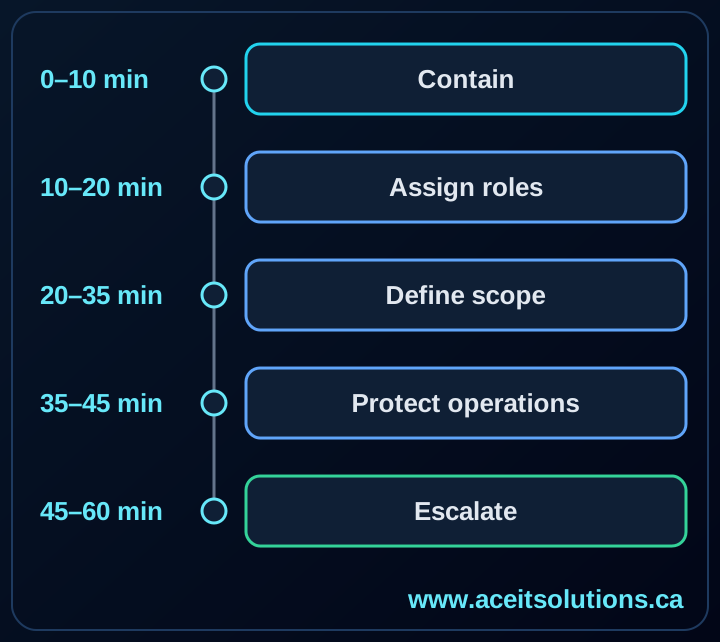
Minutes 0–10: Confirm and Contain
Open an incident log right away. A shared note or even a paper pad works. Write down what was reported, who reported it, and the time.
- Take an affected computer off Wi-Fi and unplug the network cable if the compromise looks active.
- Leave the machine powered on. Don't wipe it, reinstall it, or shut it down unless your incident lead says so.
- Disable an account that is clearly compromised and revoke its active sessions.
- Save the suspicious email, screenshots, alert text, and file names.
- Keep everyone else working, but tell them what to report if they see something odd.
If email or Teams might be compromised, don't use them to discuss the incident. A phone call is slower, but nobody else is reading it.
Minutes 10–20: Assign Roles
Pick one person to coordinate. Then give each of these jobs an owner:
- Incident lead: makes the calls and keeps the timeline.
- Technical lead: looks at systems, sign-ins, and security alerts.
- Business lead: knows which operations are affected and what matters most today.
- Communications lead: handles staff, customers, vendors, and the insurer.
In a ten-person firm one person may hold two or three of these. That's fine, as long as nobody assumes someone else is calling the insurer.
Minutes 20–35: Define the Scope
Only answer what the evidence actually shows. You will be tempted to guess.
- Which users, devices, mailboxes, applications, or locations are involved?
- Is it still happening?
- Are admin or shared accounts involved?
- Could customer, employee, or financial data be exposed?
- Can you still trust your backups and admin tools?
One infected laptop doesn't mean a one-laptop incident. Look at sign-in logs, mailbox rules, endpoint alerts, remote-access tools, and any recent admin changes before you decide it's contained.
Minutes 35–45: Protect Critical Operations
Containment shouldn't stop the business unless it has to. When you must choose, protect things in this order:
- Privileged accounts and identity systems
- Banking, payroll, and payment workflows
- Customer-facing services
- Shared files and line-of-business applications
- Backup systems and recovery credentials
If you do shut something down, write down who approved it and which business process it affects. You'll want that record later.
Minutes 45–60: Escalate and Set the Next Checkpoint
Call outside help using contact details you already had on file, not numbers from a suspicious message. Depending on the incident, that could be your IT provider, cyber insurer, lawyer, security specialist, bank, or a key software vendor. Check your policy early, since some insurers want to hear about an incident before you hire anyone.
Before the hour is up, put this in the log:
- What is confirmed, what is only suspected, and what you don't know yet
- What has been done so far
- Which systems or accounts are currently isolated
- When you will next decide what to do
- Who has to sign off on any customer or public statement
Prepare Before It Happens
Most of the first hour goes better when a few things already exist:
- An offline contact list, printed or on a phone that doesn't depend on the office network
- Named incident roles, with an alternate for each
- A current list of systems and vendors
- A tested way to disable an account and revoke its sessions
- Backups that are protected from tampering, and the recovery credentials to use them
- A simple log template
- Agreed communication and escalation paths
A one-page plan that people have walked through once beats a forty-page document nobody can find mid-incident.
Related Reading
If you haven't read it yet, our ransomware defense guide covers the prevention and recovery controls that should already be in place before an incident starts.
Ready to take the next step?
Need a practical incident response plan for your business? ACE IT can help document your first-hour actions, escalation paths, and recovery priorities.
Where to go next
If this topic is impacting your operations, these services are the fastest path to a proper fix.
Need this implemented properly?
We can assess your environment, prioritize the highest-risk issues, and execute the fix plan without disrupting your team.